
By detecting the hardware installed in your laptop, you can make safe judgements about possible upgrade paths. Unfortunately, hardware detection for laptops equipped with the Intel GL960 chipset is somewhat of a hit and miss situation. Tools such as CPUID CPU-Z should also provide a somewhat useful overview of your laptop's hardware configuration, but for all intents and purposes, I find Piriform Speccy to be more useful, and reliable.
This page will guide you through the process to obtain and understand the processor information you require to achieve an accurate and reliable result from the debugger tool.
Please note that this guide already assumes that you've downloaded the portable version of the program from the Internet, and that you have it running. The portable version doesn't require installation, and the download is 100% free.
Grabbing CPU Information from Piriform Speccy

Understanding the CPU Information — Processor Family and Model
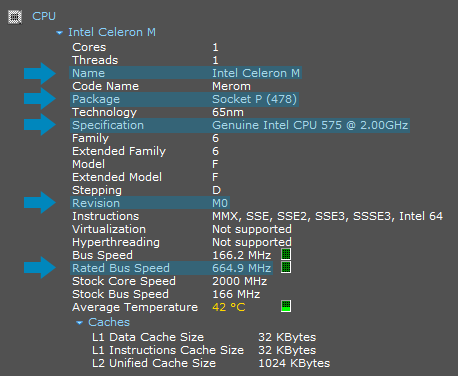
The Name and Specification lines identify the processor family and model. You will usually need to put them together in order to get the full processor model.
In this example, the laptop is equipped with an Intel Celeron M 575 laptop processor.
Understanding the CPU Information — Processor Stepping Revision
The Revision line provides your laptop's processor stepping revision. Most processors come with different stepping revisions, and this can be used to help identify both the Intel spec code and the processor package for some processor models, if required.
A processor is typically given a new stepping revision when there's an issue with the hardware that requires fixing. Examples include thermal dissipation, voltage changes and issues that affect performance, among other things. Socket compatibility and upgradability aren't affected by differentiations in stepping revisions, so two revisions of the same processor will work interchangably in the same socket.
In this example, the Intel Celeron M 575 used inside the laptop has the M0 stepping revision.
Understanding the CPU Information — Processor Package
The Package line will identify the package that your laptop's processor is using. Processors compatible with Intel's GL960 chipset come in two forms — PGA (pin-grid array) and BGA (ball-grid array).
Processors using PGA packages can more often than not be removed, replaced and upgraded. Processors with this package type feature pins along the underside and sit into a socket on the motherboard that is then locked to stop the processor from falling out.
Processors using BGA packages are fused to the motherboard directly using balls of solder located on the underside. There's no socket, and therefore these processors can't be removed, replaced or upgraded.
In this example, the Intel Celeron M 575 inside the laptop utilizes the Socket P (478) package. The "478" inside parentheses here indicates that the processor has 478 pins. The correct terminology for the processor package that fits into Intel's Socket P is PGA478, however this package is also used by other processors for different sockets (these processors aren't compatible with Socket P).
There are four packages that can be paired with the GL960 chipset. They are:
- BGA479 — 479-ball, non-upgradable.
- BGA956 — 956-ball, non-upgradable.
- PGA478 (Socket M) — 478-pin, upgradable and not compatible with Socket P.
- PGA478 (Socket P) — 478-pin, upgradable and not compatible with Socket M.
In order for a processor to be compatible with a socket, it requires both mechanical compatibility and electrical compatibility. Therefore, a processor simply fitting inside a socket isn't enough to ensure compatibility.
Understanding the CPU Information — Processor FSB
The Rated Bus Speed line shows the processor front-side bus data transfer rate. Simply pair up this speed figure with the closest match provided on the debug page. Due to the way that processor clocks work, the figures provided by Speccy are more than likely going to be different to the data rates provided on the debug page. This is normal behavior.
In this example, the Celeron M 575's front-side bus data transfer rate is 664.9 MT/s, so the closest match is 667 MT/s.
Understanding the CPU Information — Dynamic Processor Core Frequencies (EIST)
Below the cache details, you'll see details about the individual processing cores of your processor. This will be in table format if you have a multi-core processor. The information refreshes every second, and displays the current core frequency for each core in the processor. If this figure is dynamically changing as it should be, EIST is supported by your laptop, enabled and working. If the displayed frequency is static, you can safely assume that EIST isn't supported.
In the example screenshot on the right, the Core2 Duo T9300's core frequencies for both cores are dynamically updating every second. This shows that EIST is enabled and working.